 Track days let car enthusiasts drive fast and improve skills in a safe space. But one rule shocks many: no timing allowed. Whether you’re new or experienced, you need to know why timing is banned due to event and personal insurance limits. This post explains the ban, covers popular GPS data loggers like Garmin Catalyst, Video V-Box, and Race Navigator, and shows how DN Events checks devices to ensure delta timing displays are off. You can still use these tools to record video and data for later review.
Track days focus on fun, learning, and safety—not racing. Timing, even privately, can cause problems with insurance and safety. Here’s why it’s not allowed:
Track day organisers, like DN Events, use special insurance to cover accidents, damage, or injuries. These policies often don’t cover “racing” or “competitive driving.” Overt timing—using apps, stopwatches, or data loggers— can cause drivers to ‘push’ during a lap, to compete against themselves. It counts as competitive. If an accident happens and timing is found, insurance may not pay, leaving organisers and drivers at risk.
Many drivers buy their own track day insurance for car damage. Like event insurance, these policies usually don’t cover timed runs. If you time your laps, your insurance might not pay for repairs, potentially costing you a ruinous amount of money. Following the no-timing rule keeps your insurance coverage safe and intact.
Timing pushes drivers to go faster, which can lead to risky moves or crashes. Track days have strict rules, like safe passing zones and overtaking rules, to keep everyone safe. Timing makes drivers focus on speed, not safety, putting others in danger.
Track days welcome all skill levels. Timing can make new drivers feel pressured to keep up with faster ones, creating a competitive vibe. Banning timing keeps the event friendly and fun for everyone.
Data loggers help drivers improve, but their delta timing displays—showing real-time lap time differences—break track day rules. You can still use these devices to record video and data for later review. Here are popular ones:
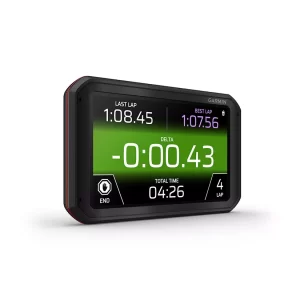
The Garmin Catalyst gives coaching, lap times, and video. Its 7-inch screen shows delta times, comparing your lap to your best. These displays must be off during track days, but you can record data and video for later.
The Video V-Box (like VBOX Video HD2) mixes HD video with GPS data, showing lap times and delta times. You must turn off delta timing displays for track days, but video and data logging are okay for post-session review.
The Race Navigator uses GPS for lap timing and delta displays. Turn off delta timing features during track days, but you can still record laps to analyse later.
Tools like AiM Solo 2, RaceLogic, and APEX Pro also have delta timing displays. Disable these for track days, but keep recording video and data for after-session analysis.
 DN Events puts safety and insurance first. We check that device displays, especially delta timing displays, are off before you hit the track. Here’s how we do it:
Before you drive, our team inspects vehicles for data loggers, phones, or apps that can delta time laps. We ensure devices like Garmin Catalyst, Video V-Box, or Race Navigator have delta timing displays off. If they’re on, you’ll need to disable them or remove the device screen. Video and data logging are fine for later review off track.
In pre-event briefings, we explain the no-timing rule and why it matters for insurance and safety. We’ll show you how to turn off delta timing displays while keeping video and data logging active.
Our instructors and marshals watch for signs of racing, like aggressive driving. If we suspect delta timing, we may recheck devices. Violators will be excluded from further participation in the event and risk a permanent ban.
Using delta timing displays can get you kicked out without a refund. It may also void event and personal insurance, leading to big costs. Following rules keeps everyone safe and covered.
You can use data loggers without breaking the ‘no-timing’ rule. Here’s how:
Private timing counts as competitive, risking event and personal insurance. We ban all timing to keep everyone safe.
Yes, as long as timing displays are off. Record for post-session review without issues.
If we spot it, you’ll need to disable it right away. Repeat issues could mean leaving the event.
We check devices, watch driving behaviour, and listen to marshal or driver reports.
Track days are for fun, learning, and enjoying your car—not racing for times. The no-timing rule, driven by event and personal insurance limits, keeps everyone safe and covered. At DN Events, we check devices like Garmin Catalyst, Video V-Box, and Race Navigator to ensure delta timing displays are off. You can still record video and data to review later. Join us for a safe, thrilling track day!
Ready to drive? Book with DN Events and enjoy worry-free fun. Got questions about rules or devices? Contact us today!